

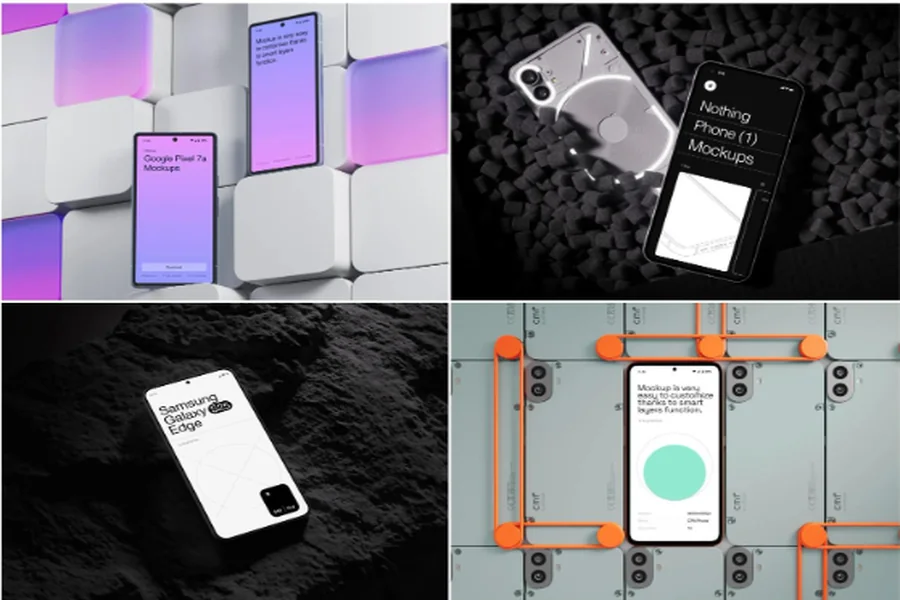
Why Visual Presentation Matters More Than Ever
When launching an app across multiple platforms, your first impression determines everything. Developers and designers face a unique challenge: showcasing an Android application alongside iOS versions while maintaining visual consistency. An android mockup becomes your secret weapon, transforming raw screenshots into professional presentations that investors, stakeholders, and users can’t ignore.
Cross-platform development demands more than functional code. Your app needs to shine on every device, in every context, across every marketing channel. Quality mockups bridge the gap between technical achievement and market appeal.
The Cross-Platform Design Challenge
Building apps for Android, iOS, and web platforms creates presentation headaches:
- Screenshots from different devices rarely match in quality or perspective
- Generic templates make your innovative app look ordinary
- Inconsistent styling across marketing materials confuses your audience
- Time-consuming manual editing delays product launches
Professional mockups solve these problems by providing a unified visual language. Your Android app appears in premium contexts that highlight its sophistication rather than technical constraints.
Premium Tools Make the Difference
Platforms like ls.graphics have revolutionized mockup creation with features that elevate your presentations:
- Ultra-realistic rendering captures every detail—from screen reflections to device shadows—creating presentations indistinguishable from professional photography that make your app look premium and polished.
- Organized layers give designers complete control, allowing you to adjust backgrounds, shadows, and device colors in seconds rather than hours, streamlining your entire creative workflow.
- Different angles showcase specific features effectively: straight-on views emphasize interface clarity, while perspective shots demonstrate real-world usage contexts that resonate with audiences.
- Multiple color styles let you match mockups to brand guidelines without compromising device authenticity, ensuring visual consistency across all marketing materials.
These stylish minimalistic compositions keep focus on your app while maintaining professional polish. Best of all, they’re very easy to use. Drag your screenshot into the smart object layer, and the mockup automatically adjusts perspective, lighting, and reflections. No Photoshop expertise required.
Real-World Applications That Drive Results
Consider a fintech startup pitching to venture capitalists. They present their payment app on realistic device frames, showing how the interface adapts from Samsung Galaxy to Pixel phones. The android mockup doesn’t just display features—it tells a story of accessibility and thoughtful design. One founder reported that adding professional mockups to their pitch deck increased investor engagement by 40%.
E-commerce brands use these tools differently. A fashion retailer showcases their shopping app on multiple Android devices simultaneously, demonstrating responsive design across screen sizes. Marketing teams create App Store graphics, social media ads, and website banners—all from a single set of mockups that maintain brand consistency.
Streamlining Your Workflow
Efficient teams build mockup libraries early. When preparing for a product launch, having pre-made templates for common scenarios—app stores, social media, presentations—saves countless hours. One design agency reduced their client delivery time by 60% after establishing a systematic mockup workflow.
The key is choosing versatile templates that adapt to multiple contexts. A single high-quality mockup can generate dozens of marketing assets through simple background and color adjustments.
Beyond Marketing: Testing and Feedback
Mockups aren’t just for external audiences. User testing sessions become more realistic when participants view prototypes on actual device representations. Stakeholder reviews proceed smoothly when everyone sees the same polished presentation rather than inconsistent screenshots.
Development teams use mockups in documentation, showing exactly how features should appear on specific Android models. This precision reduces miscommunication between designers and developers.
Conclusion
Professional mockups have evolved from nice-to-have design extras to essential tools for cross-platform success. They unite your marketing efforts, streamline your workflow, and ensure your Android app makes the powerful first impression it deserves. Investing in quality presentation tools isn’t vanity—it’s strategic positioning in an increasingly competitive marketplace.
